Improving Job Application Experience on LinkedIn
Case Study
Problem Discovery
Users often forget where they applied, lose documents, or miss follow-ups, ultimately lowering engagement and trust in the platform.
User inter v iews re v ealed that applicants lose track of their LinkedIn applications after submission. With unclear statuses and
Scattered tools, the process feels like a “black hole”, causing confusion, missed follow-ups, and reduced trust in the platform.
Users often forget where they applied, lose documents, or miss follow-ups, ultimately lowering engagement and trust in the platform.
Our Solution
A new feature that helps job seekers find their job application process easier with the uni q ue selling points :
Designed to address the frustrations uncovered during research, this concept brings organisation, clarity, and motivation into every step of the job application journey, all within LinkedIn.
1
Smart Application Tracker
Track all job applications in one place and view progress across every stage at a glance.
2
Insightful Job Analytics
Get data-driven insights into your application performance, from Interviews to offers.
3
Tailored Document Management
Save and organise customised resumes
and cover letters for each job applied.
4
Intelligent R eminders & Updates
Stay on top of every message, follow-up, and deadline with smart reminders
and status alerts.
The Process
About LinkedIn Details LinkedIn
Our research into LinkedIn shows its massive impact on global hiring
With over a billion members, millions of active job listings, and most recruiters relying on the platform. This scale emphasises the need for smoother, more transparent job application experiences.

Recruitment Process
To better understand the recruitment ecosystem, we mapped the process from both the employer’s and the applicant’s perspectives.
This visualisation helped identify potential pain points and inefficiencies in how both sides interact throughout the journey.

Users often forget where they applied, lose documents, or miss follow-ups, ultimately lowering engagement and trust in the platform.
Analysing Applicant’s Frustrations
Early user research revealed that LinkedIn’s job application flow heavily supports users before clicking “Apply,” but offers little to no guidance or visibility afterward.
User research highlighted a series of frustrations that applicants commonly face when applying through LinkedIn. Analysing these helped us map the end-to-end journey and uncover unmet needs beyond the “Apply” stage.

LinkedIn currently lacks a feature that supports job seekers after applying.
User research highlighted a series of frustrations that applicants commonly face when applying through LinkedIn. Analysing these helped us map the end-to-end journey and uncover unmet needs beyond the “Apply” stage.

The Experience Loop
When users can track progress and get updates, they stay engaged and see LinkedIn as a complete career hub, not just a job search tool.
We set out to understand how “keeping track of multiple applications” impacts user motivation and engagement with the platform. To explore this, we mapped the entire job-seeking journey, identified key drop-off points after applying, and validated our insights through user interviews and competitor audits.

Interview
Interviews with 15+ active job seekers revealed a shared frustration, losing track of applications and receiving little to no feedback after applying.
We conducted semi-structured interviews with users who use LinkedIn and other job platforms. Participants described the job application process as disconnected, unclear, and emotionally draining once they hit “Apply.”
“What are your biggest challenges when tracking your job applications on LinkedIn?”

Key Findings
Users struggled to track their applications after submitting them.
The biggest insight we found was that the users lost visibility and control after applying.

Story Boarding
We mapped the applicant’s journey to see where things start to break or feel frustrating.
Through storyboarding, we visualised real-world pain points to better understand where the process breaks down and how LinkedIn could create value.

Analysing Market & Competitions
We explored how leading platforms like Indeed, Glassdoor, Xing, and Hunter guide applicants after “Apply.”
Some offered status updates, others visual progress or recruiter visibility. LinkedIn, by contrast, left users wondering what comes next.
Tracking Gap
Application tracking is hidden or incomplete. Applicants rarely see status updates or recruiter responses, forcing them to rely on spreadsheets or external tools.
Trust Gap
Unverified or fake job posts reduce confidence. Users hesitate to apply when recruiter's identity and job authenticity are unclear
Engagement Gap
Users disengage after applying because the process offers no feedback, progress indicators, or follow-up reminders, causing them to leave the platform and lose momentum.

Despite multiple job portals on the market, why do users still rely on spreadsheets and other tools to manage their job applications?
Defining Persona & Goals
Understanding different job seeker behaviours to design solutions that meet their unique needs.
Research revealed two main applicant types, those casually exploring opportunities and those actively applying. Defining these personas helped shape features and priorities that address each group’s motivations and challenges.

Feature Prioritisation
Limited resources required us to prioritise features by impact and effort.
With limited time and resources, we prioritised our features based on impact vs. effort, focusing first on solutions that could bring the most user value with minimal complexity. This prioritisation was guided by an impact–effort matrix, supported by team workshops, voting sessions, and frequent alignment with user pain points identified during research.

Iterations from User Feedbacks
Turning user feedback into a more connected, intuitive, and motivating experience.
Users loved the clarity, clean layout, and integration inside LinkedIn, but wanted a more interactive, motivational, and streamlined experience. The next iteration focused on combining these strengths with deeper control, simplified structure, and improved emotional connection.

The Final Design
We redesigned LinkedIn’s “My Jobs” to create a seamless, transparent way for users to track, manage, and analyse their job applications, all without leaving LinkedIn.
The redesigned interface helps users visualise their progress, analyse outcomes, and stay informed — bringing organisation, transparency, and engagement directly into the LinkedIn ecosystem.
My Jobs Dashboard – From Lists to Insights
The old “My Jobs” section offered static tabs with little visibility into progress.
The redesign introduces four clear sections: Saved Jobs, Applied Job Tracking, Dashboard, and Archived, plus a new analytics dashboard that visualises key metrics and insights.
This update improves clarity, transparency, and motivation, helping users track and optimise their job application within LinkedIn.


Applied Jobs Tracking –
A New Native Feature
We introduced a dedicated tracking feature that helps users manage their applied jobs across stages with clarity and control.
This includes:
-
Kanban & Table Views for flexible tracking
(e.g., Applied → Interview → Offer).
-
Upcoming Deadlines reminders and task summaries.
-
Editable Job Statuses and quick actions to add notes, follow-ups, or new applications.
This feature brings structure and motivation to the job-hunting process while keeping users engaged within LinkedIn.
Job Details Page –
One Hub for All Activities
The enhanced Job Details page centralises everything related to each applied job. Users can now access AI Tools
-
Manage Activities
-
Manage Notes
-
Manage the contacts of the applied job
-
Manage Documents
-
Manage Reminders


AI-Powered Career Tools –
From Cover Letter to Interview Prep
Access AI-powered tools with three primary cards:
-
Generate Cover Letter
-
Salary Benchmarking
-
Interview Prep — each with a one-line value and a primary CTA
Activities Hub –
Track Every Interaction in One Place
Track activities (emails, recruiter updates, deadlines) in one chronological timeline.
Access a dedicated Activities tab with a composer (Type + Details) and a chronological timeline. This tab keeps all the documents that are related to the specific applied job, like tailored resume and cover letter.

File Management – Keep Every
Resume and Cover Letter in Sync
Manage all documents (resume, portfolio, cover letter) via drag-and-drop uploads.
Provide a Documents section with drag-and-drop upload, a clear file list, and quick actions.

Background
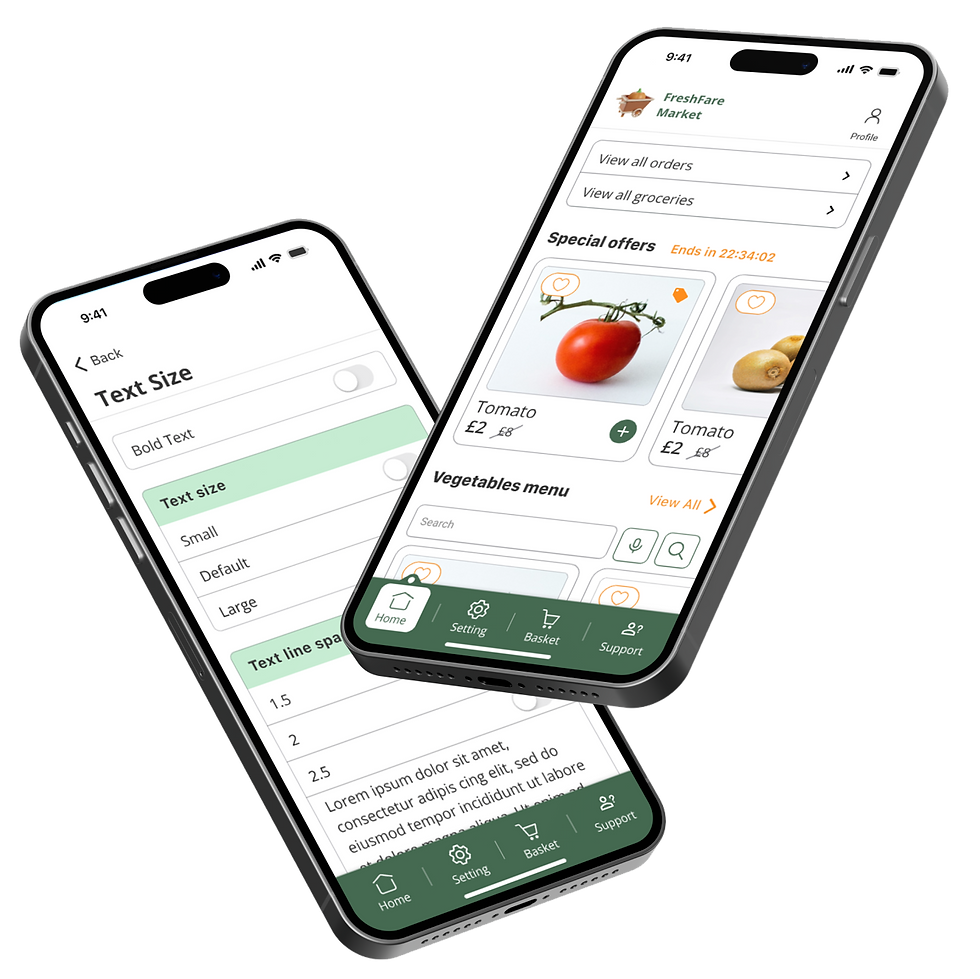
Vegetable and fruit ordering apps make buying fresh produce easy but can be difficult for disabled users. Problems include poor compatibility with screen readers for the visually impaired, hard-to-use navigation for those with cognitive issues, and inaccessible delivery points for people with mobility challenges. To help, these apps need to be more user-friendly, offer better customer support, and ensure delivery services are accessible to everyone.
Impacts From User Feedbacks
Bringing clarity and confidence to job seekers, the concept improved efficiency, engagement, and helped users feel more organised and connected to their applications.
Ideas gain depth and direction when tested within real-world constraints not in isolation.
While the process was shaped by time and scope limitations, these constraints helped prioritise what truly mattered — clarity, usability, and motivation for job seekers.
Through iterative validation and reflection, we learned that meaningful design emerges from balancing ambition with practicality, and grounding every idea in authentic user context.
Impact highlights:
-
Most participants said they would no longer need external tools (spreadsheets, notes).
-
Users described the experience as “reassuring” and “motivating.”
What We Learned Along the Way
The project began as a research-heavy exploration, but our understanding shifted as we engaged directly with users and contextual scenarios.
Ideas gain depth and direction when tested within real-world constraints not in isolation.
While the process was shaped by time and scope limitations, these constraints helped prioritise what truly mattered — clarity, usability, and motivation for job seekers.
Through iterative validation and reflection, we learned that meaningful design emerges from balancing ambition with practicality, and grounding every idea in authentic user context.
As a Result
-
We focused on designing a native job tracking experience to make LinkedIn more engaging and supportive for job seekers.
-
Time and scope constraints shaped our priorities, helping us focus on clarity and motivation.
-
Simplifying post-apply experiences can have as much impact as improving search or onboarding flows.
-
Native integration (not adding another tool) was crucial to maintaining adoption and continuity.